Is the library going to order the next book by a major author? When can I place a hold on it?
Answer
The library has standing orders for books by over 200 major authors in many genres, including authors such as Gillian Flynn, Ken Follett, John Grisham, Anne Hillerman, George R.R. Martin, and James Patterson. Books that are automatically ordered usually show up in the catalog approximately 8 weeks prior to the book's release date. Once a book is in the catalog, you may place a hold on it by choosing the Place Hold icon on the right of the screen.
We also purchase many other books each month, selected by library staff members and from customer suggestions. You can recommend a purchase via our Suggest a Purchase form.
The best way to be notified when an item you want is added to our catalog is to sign up for Author Alerts. Sign up with your phone number or email address, then subscribe to authors you wish to be notified about. When a title by any author you have subscribed to is added to the library catalog, you will receive a notification. This only works for physical items.
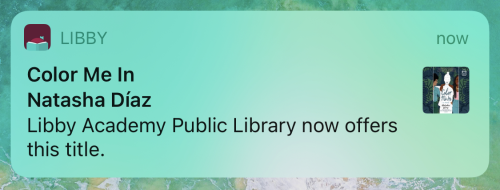
For titles in Libby, you can set up Notify Me tags in Libby to be notified when the library adds a title to its Libby collection.
When searching a library in Libby, you may discover titles that aren't in their collection. These titles will have a Notify Me button (instead of Borrow or Place Hold). Selecting Notify Me sets up a smart tag in Libby that will alert you if one of your libraries purchases the title at a later date.
Here's how it works in the app:
- Search for a specific title, author, or series.

- If you see the title you're interested in, and it has a Notify Me button, skip to step 5.
If you don't see the title you're looking for in the search results:- If there are fewer than 100 results, tap
 and continue to step 3.

- If there are more than 100 results, try a more specific search (like the book's full title and the author's name).
Note: Some books have never been published digitally, and some digital titles may not be available for purchase by your library.
- If there are fewer than 100 results, tap
- Near the bottom of the panel with filter options, select deep search. This filter adds titles that match your search query and are not in your library's catalog to your search results.

- Tap Show Titles.
Note: If any titles are offered by your other saved libraries, you'll see the option to borrow or place them on hold right away. - Tap Notify Me. The first time you tap this button, you'll be walked through a quick tutorial to set up a Notify Me smart tag (or prompted to use one you've already set up).

- In the tutorial, select Manage Notifications, then select a notification option for Notify Me:Title.
If the Public Library purchases the title, you'll be notified and have the option to borrow or place the title on hold (depending on its availability).